
Built on PawaPay · 21 African countries
Mobile Money checkout for WooCommerce, across Africa
Fosia Pay connects your store to your own PawaPay account. Customers pay with MTN MoMo, Airtel Money, Orange Money, M-Pesa and 40+ networks in 21 countries, and you keep every franc, shilling and cedi: no commission.
- Free plan, unlimited payments
- No commission on sales
- 14-day refund on paid plans
Works with the wallets your customers already use
- MTN MoMo
- Airtel Money
- Orange Money
- M-Pesa
- Moov Money
- Wave
- Telecel Cash
- AT Money
- Mixx by Yas
- Halopesa
- Free Money
- TNM Mpamba
- e-Mola
- Zamtel Kwacha
- EcoCash
Operator names are shown for information only. Availability depends on what PawaPay has enabled on your merchant account.
21
African countries
40+
Mobile Money networks
16
local currencies
0%
commission taken by Fosia
How it works
Live in three steps
No code, no aggregator in the middle. Most stores are ready in an afternoon.
Install the plugin
Download Fosia Pay Lite for free, or buy a plan and get your license key by email. Upload the plugin to WordPress and activate it.
Connect PawaPay
Paste your PawaPay API token and copy the callback URL into your PawaPay dashboard. Test everything in sandbox mode first.
Get paid
The customer confirms on their phone. Fosia Pay verifies PawaPay's signed confirmation and marks the WooCommerce order as paid, automatically.
Fosia Pay
Everything after the checkout, too
Other gateways stop when the customer pays. Fosia Pay also handles refunds, payouts and payment links.

Hosted or native checkout
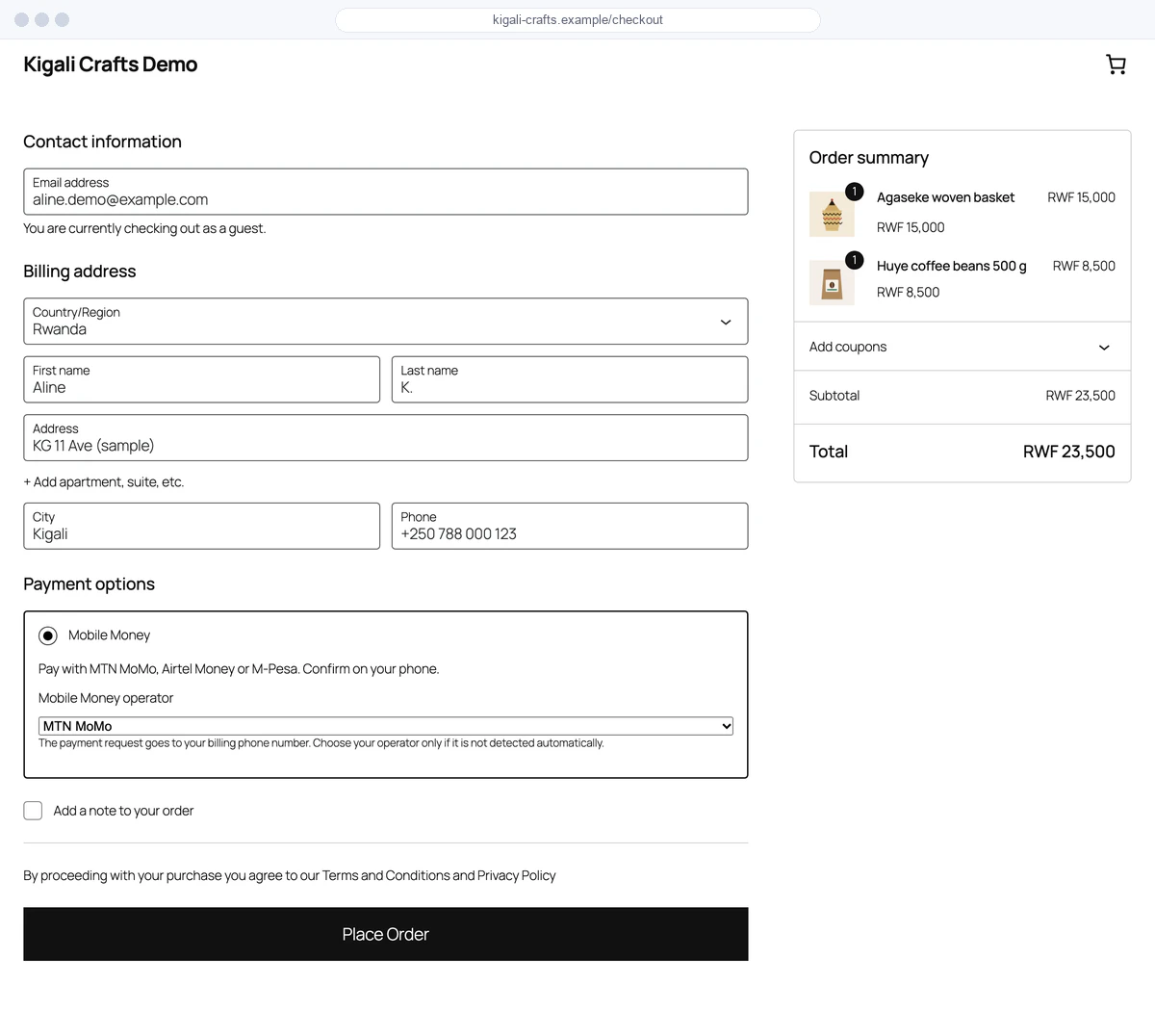
Lite sends customers to a secure PawaPay page. Pro adds native USSD checkout: the payment prompt reaches the phone without leaving your store.

Detects the operator for you
Country, currency and network are read from the phone number. Store prices are converted to the customer's local currency.

Callbacks you can trust
PawaPay's RFC 9421 signed callbacks are verified before any order changes. A fake notification can't mark an order as paid.

Refunds from WooCommerce
Refund an order in full or in part from the usual WooCommerce screen. The money goes back to the customer's wallet.

Payouts in bulk
Send money to suppliers, staff or sellers one by one, or upload a CSV list (up to 1,000 rows). You review every amount before anything is sent, and a row is never paid twice.

Payment links and QR codes
Sell on WhatsApp, Instagram or in person: create a link with a fixed or open amount and share it, or print its QR code.
Why us
Why Fosia Pay
Facts you can check in the plugin, its changelog and its readme.

Free, unlimited, no commission
Lite has no payment limit and no license key. Fosia never takes a share of your sales: you only pay PawaPay's own fees.
Paid only when PawaPay confirms
An order is marked paid after a verified PawaPay signature (RFC 9421) or a status check with PawaPay, with the amount and currency compared to the order.
Fewer lost payments
On paid plans the number is checked as the customer types, an operator outage is shown before paying, and a failed payment comes with the reason and a one-tap retry.
Accept, refund and pay out
Refunds from the WooCommerce order, payouts to one person or a CSV list with a review step, payment links with QR codes: all in WordPress.

Your PawaPay token stays on your server
The API and AI tools use a separate site key you can regenerate at any time, never your PawaPay token.

Clear licenses, a team you can reach
Pay by Mobile Money, no automatic renewal, 14-day refund. Support from Kigali in English and French, with response times written on the pricing page.
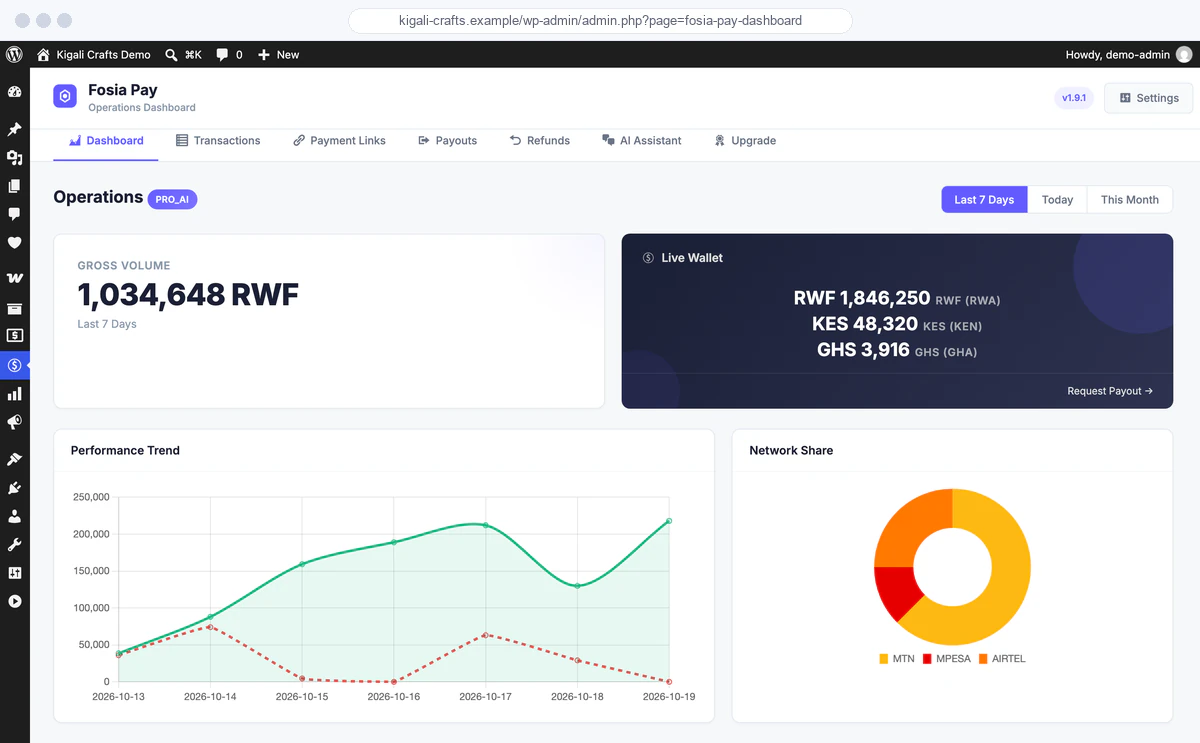
Dashboard
See your Mobile Money business at a glance
Volume, success rate and network share for today, the last 7 days or the month, right in WordPress.
Developers & AI
An API your tools and AI agents can use
Pro + AI includes a REST API on your own store, with a site key that is not your PawaPay token. The MCP server for Claude, Codex or Cursor is in early access: payout and refund tools ask for your confirmation before any money moves.
curl https://shop.example/wp-json/fosia/v1/transactions?limit=5 \
  -H "Authorization: Bearer fpk_..."
Pricing
Simple, transparent pricing
Start free. Upgrade when you need more: pay yearly, or once for a lifetime license. Never renewed behind your back.
Every paid plan: pay yearly, or once for a lifetime license.
Lite
Free forever
Accept Mobile Money with no limit and no license key.
Pro
Most popular
$19.99 / year
$59 once, for life
For stores that want checkout on their own site, fewer failed payments, refunds and payouts.
Pro + AI
$39.99 / year
$119 once, for life
For stores that automate: recurring billing, a REST API and AI tools.
Agency
$79.99 / year
$249 once, for life
For agencies and businesses running several stores.
More from Fosia
Tools built around the same Mobile Money rails.

Fosia Crowdfunding
Campaign pages, donation forms and fundraising drives paid by Mobile Money, on your own site.
Add-on · from $29.99 / year

Divi 5 modules
Pay Button, Payment Link Card, Pricing Table and Accepted Networks: native Divi 5 modules for Fosia Pay.
Included in every paid plan

REST API & MCP server
Automate payments, payouts and refunds from your own code or an AI agent.
Pro + AI and Agency
FAQ
Questions, answered
Does Fosia Pay take a commission on my sales?
No, never, on any plan. You pay PawaPay's own processing fees directly to PawaPay, plus a flat license if you choose a paid plan. Fosia Ltd never holds your money: payments settle into your own PawaPay wallet.
Do I need a PawaPay account?
Yes. Fosia Pay connects WooCommerce to your PawaPay merchant account (sign-up is free at pawapay.io). Country and operator availability depends on what PawaPay enables on your account.
Which countries does it work in?
21 African countries: the countries enabled on your PawaPay account, among Benin, Burkina Faso, Cameroon, Congo, DR Congo, Côte d'Ivoire, Ethiopia, Gabon, Ghana, Kenya, Lesotho, Malawi, Mozambique, Nigeria, Rwanda, Senegal, Sierra Leone, Tanzania, Uganda, Zambia and Zimbabwe. Some operators need PawaPay's approval first: M-Pesa in Kenya, for example, is reserved by PawaPay for approved (enterprise) merchants, so check with PawaPay before you count on it.
My store prices are in US dollars or euros. Does that work?
Yes. Keep your store in USD, EUR or your own currency: Fosia Pay converts the amount to the customer's Mobile Money currency (RWF, KES, XOF, GHS…) at checkout, at the current exchange rate, and the customer approves that amount on their phone. It sits next to your other WooCommerce payment methods, such as Stripe or PayPal for cards.
Is Lite really free and unlimited?
Yes. Lite accepts as many Mobile Money payments as your store receives, on 1 site, through the secure PawaPay payment page. Pro adds checkout on your own site without a redirect, fewer failed payments, refunds, payouts and payment links; Pro + AI adds recurring billing, the API and AI tools.
What happens when my license expires?
Yearly licenses never renew automatically, so there is nothing to cancel. If you don't renew, Fosia Pay keeps accepting payments in Lite mode (hosted PawaPay page, unlimited payments) and paid features pause until you renew. Your settings and order history are kept. Lifetime licenses never expire.
Can I get a refund?
Yes. Every license, yearly or lifetime, and every renewal can be refunded in full within 14 days, by Mobile Money. See the refund policy.
Ready to accept Mobile Money?
Install Lite for free today, with unlimited payments. Move to Pro when you want checkout on your own site, refunds and payouts.