

Fosia Collect · free WordPress plugin
Mobile Money donations and payments on any WordPress page
Add a Donate or Pay form to your site in minutes. People give with MTN MoMo, Airtel Money, Orange Money or M-Pesa, and the money goes straight to your own payment account. Free, with no WooCommerce needed.
- Free, unlimited forms and payments
- No WooCommerce needed
- No commission
Made for organisations that don't sell products
- NGOs and charities
- Churches and faith groups
- Schools and parents' associations
- Associations and clubs
- Freelancers and small services
- Events and community projects
Not on WordPress? Fosia Connect gives you payment links, QR codes and a payment page for any site, social page or WhatsApp. See Fosia Connect
How it works
How it works
From install to the first donation in a few minutes.
Install and connect
A guided setup opens after activation. Paste your payment account's API token: it is tested before it is saved. Try everything in sandbox mode first.
Add the form to a page
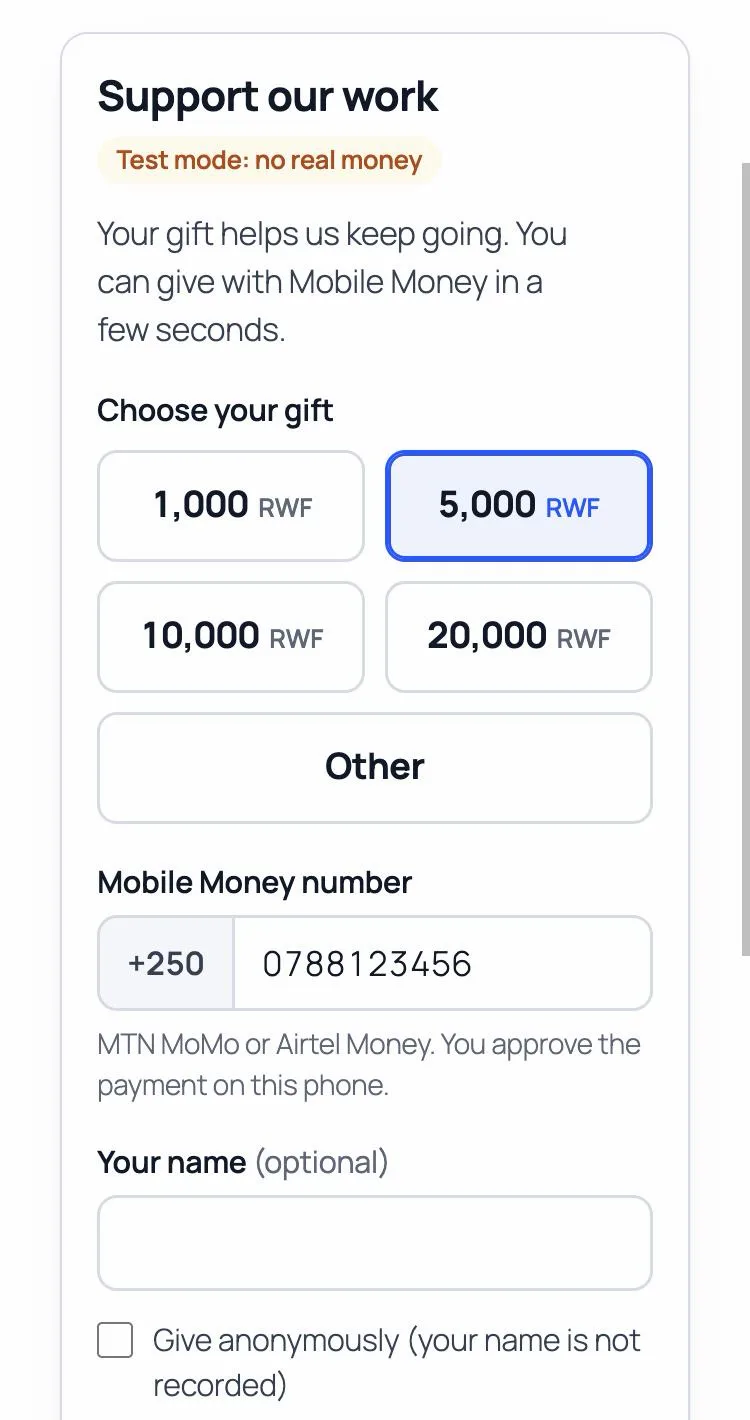
Use the Fosia Collect block, or a shortcode with any page builder. Choose Donate or Pay, the amounts, the currency and the fields.
People pay on their phone
They pick an amount, type their Mobile Money number and approve the payment with their PIN on a secure payment page.
You see every payment
The payer sees the real status; you see each payment with its amount and reference, the totals per form and a CSV export.
Features
What you get
Free, with unlimited forms and payments.

The payer sees the real status
Paid, not received yet or failed, read from your payment account. Never a “thank you” for a payment that did not arrive.

Every payment in one place
A dashboard with this month's total and each form's total, filters and a CSV export for your accounts.

Refunds and receipts
Full or partial refunds to the number that paid, and an e-mail receipt once the payment is confirmed.

Every payment checked
A payment shows as paid only once your payment account confirms it, with exactly the amount and currency asked.

The money goes straight to you
Payments settle in your own account. Fosia never holds the money and takes no commission.

Payers' data stays on your site
Stored in your own database and erased after the period you choose. No tracking, no ads.
Collect or Crowdfunding
A form, or a full campaign?
Both take Mobile Money. Pick the one that fits what you are raising money for.
Fosia Collect: a simple form
One Pay or Donate form on any page, without WooCommerce. Best for regular giving, fees and contributions, when you don't need a campaign page.
Free

Fosia Crowdfunding: full campaigns
A campaign page with a goal and a progress bar, the story, budget lines, a donor list and updates. Each donation is a WooCommerce order paid with Fosia Pay.
Lite free · Pro from $29.99 / year
In short
What is Fosia Collect?
Fosia Collect is a free WordPress plugin that adds a Donate or Pay form to any page, paid by Mobile Money. NGOs, churches, schools, associations and freelancers take MTN MoMo, Airtel Money, Orange Money, M-Pesa and other Mobile Money payments without WooCommerce. The money goes straight to the organisation's own payment account, and each payment is checked with that account before it is shown as paid. Fosia takes no commission.
- Type: donation and payment form plugin for WordPress (block and shortcode)
- Needs: WordPress 6.3+, PHP 7.4+, HTTPS and your own payment account; no WooCommerce
- Amounts: up to 6 quick amounts and “Other”, or one fixed amount; local currency, USD or EUR
- For you: payments list with filters and CSV export, totals per form, refunds, e-mail receipts
- Privacy: payers' details erased automatically after the period you choose; anonymous giving
- Price: free, unlimited forms and payments, no commission
FAQ
Fosia Collect questions
Do I need WooCommerce?
No. Fosia Collect works on its own, without a shop or a cart. If your site also runs WooCommerce, the two do not touch each other: Fosia Collect keeps its payments in its own list.
Is it free? Does Fosia take a commission?
The plugin is free, with no limit on the number of forms or payments. Fosia takes no commission: the only fees are PawaPay's own processing fees.
Do I need a PawaPay account?
Yes, your own merchant account: the money goes to it, never through Fosia. A sandbox account to test is free and opens in minutes; the live account is opened after your organisation's documents are checked.
Which countries and Mobile Money networks does it work with?
The countries and operators enabled on your payment account, among 21 African countries: Benin, Burkina Faso, Cameroon, Congo, DR Congo, Côte d'Ivoire, Ethiopia, Gabon, Ghana, Kenya, Lesotho, Malawi, Mozambique, Nigeria, Rwanda, Senegal, Sierra Leone, Tanzania, Uganda, Zambia, Zimbabwe: MTN MoMo, Airtel Money, Orange Money, M-Pesa, Moov Money and more.
Can my form be in US dollars?
Yes. A form can be in a Mobile Money currency (RWF, KES, UGX, XOF, GHS…) or in USD or EUR: the payer sees an estimate in their own currency before paying, converted at the day's rate, and approves that amount on their phone.
Can people give anonymously?
Yes, if you keep “Give anonymously” on: the payer's name is then not recorded, and the payment shows “Anonymous” in your list. Name, e-mail and message are each optional, required or hidden, as you choose.
What if a payer closes the page before coming back?
The payment is still confirmed: Fosia Collect keeps checking it in the background, and it appears as paid in your list once your payment account confirms it.
My shop already uses the callback address of the same payment account. Is that a problem?
No. Your payment account keeps one callback address for incoming payments. If a shop plugin already uses it, leave it: Fosia Collect confirms each payment by asking your payment account itself, when the payer comes back and in the background. The callback only makes confirmation faster.
I'm not on WordPress. Is there something for me?
Yes. Fosia Connect gives you payment links, QR codes and a payment page for any site, social page or WhatsApp, paid by Mobile Money into your own payment account, with no plugin to install.
Can I refund a payment?
Yes, fully or partly, from the payment's details in WordPress: the money goes back to the Mobile Money number that paid. You can never refund more than what was paid, refunds made elsewhere can be recorded on the same screen, and each refund is followed until it is final, with a note of who refunded, when and how much.
Can I set up monthly giving?
No. Mobile Money asks the payer to approve every payment on their phone, so there is no automatic debit.
Also from Fosia
Built on the same Mobile Money rails, by the same team.

Fosia Pay for WooCommerce
The Mobile Money payment gateway for WooCommerce: free Lite plan, Pro adds on-site checkout, refunds, payouts and payment links.
Lite free · Pro from $19.99 / year
Fosia Crowdfunding
Crowdfunding and donation pages paid by Mobile Money. Lite is free with unlimited campaigns.
Lite free · Pro from $29.99 / year

Fosia Affiliates
Your own WooCommerce affiliate programme: links, coupon codes and monthly Mobile Money payouts to your partners.
From $9.99 / year

Fosia Connect
A Mobile Money API, payment links and QR codes for any website, or no website at all.
From $2 for 100 payments
New to Mobile Money on WordPress? Read the getting started guide
Put a Donate button on your site today
Free, unlimited forms and payments, and the money goes straight to your own account.